Published by Adrian Vogel · Reading time: approx. 14 minutes · Last updated: October 2026 · Jurisdiction: Germany
Before you start: This guide is not legal or tax advice. OWNAMIC checks neither your rights against a shop nor your tax return. Deadlines and amounts reflect the position in October 2026. If in doubt, check them with a consumer advice centre (Verbraucherzentrale), your tax office or your tax adviser.
In short:
- In the end, every important receipt is attached to the item it belongs to.
- You need your till receipts, invoices and proofs of payment.
- Photograph every receipt on the day you buy, then it goes quickly.
- OWNAMIC does not search the text of your receipts or check your tax.
Receipts are the part of a home contents record that proves a value. How they fit into a complete inventory is covered in A Home Contents Inventory for Your Insurer: Step by Step. This article is about everyday life: the slip at the checkout, the PDF invoice in your inbox, the bill from the heating engineer. And about finding them again in two years' time.

What you should know
Thermal paper fades. Most till receipts are printed on thermal paper. This paper turns black where it is heated. There is no ink. Light, heat, hand cream and plastic sleeves make the print disappear, sometimes within months. Stored in the dark, a receipt often lasts for years, according to Stiftung Warentest. But it is wiser not to rely on that. A photo on the day of purchase is the simplest safeguard.
Statutory warranty: two years, and in the first year the shop has to prove it. The statutory warranty means the seller must answer for defects. A defect is a fault the goods already had when you bought them. If you buy from a business as a consumer in Germany, this applies for two years (§ 438(1) no. 3 of the German Civil Code, BGB). What if a defect appears in the first year? Since 1 January 2022, it is then assumed that the defect was there at the time of purchase (§ 477 BGB). This is called the reversal of the burden of proof. You do not have to prove it. The seller has to prove the opposite. Before 2022 this only applied for six months. For second-hand goods, the seller may shorten the period to one year. But you must expressly agree to this (§ 476(2) BGB). When buying from a private seller, the warranty can be excluded entirely.
Statutory warranty is not a guarantee. The statutory warranty (Gewährleistung) is set by law. It is a right against the seller. A guarantee (Garantie) is a voluntary promise, usually from the manufacturer. It comes with the manufacturer's own terms. For the statutory warranty you have to prove the purchase. You do not necessarily need the original receipt for that. A bank statement showing the card payment or a photo of the receipt is usually enough. With a guarantee, the manufacturer may ask for the original receipt. So read the guarantee terms. In those cases, keep the paper as well.
Keeping records: no general obligation, one important exception. Private individuals in Germany generally do not have to keep receipts. For your tax return, a duty to keep receipts available has applied since 2017. This means you only send receipts if the tax office asks for them. Until then, you must be able to show them. The exception is in the German VAT Act (§ 14b UStG). It covers invoices for work on a house, flat or plot of land, for example from a painter, roofer or plumber. You must keep these invoices for two years. The two years count from the end of the year in which the invoice was issued. If you fail to do so on purpose or recklessly, you risk a fine of up to €500. The tradesperson must point out this duty on the invoice.
Tradespeople's work in your tax return. Work by tradespeople in your household can lower your tax. You deduct 20% of the labour costs directly from your tax, up to €1,200 a year (§ 35a of the German Income Tax Act, EStG). Material costs do not count. You need an invoice. And you must have paid into the tradesperson's account. Cash payment does not count. The government has put forward a draft law: from 2027 the rate is to drop to 15%, up to €900. As of October 2026 this has not been passed. The existing figures apply to payments made in 2026.
Insurance. After a loss, a purchase receipt proves what an item cost. A photo only shows that it was there. More on this in When the House Burns Down and Nothing Is Documented.
Which route for which receipt
OWNAMIC has three routes. Which one fits depends on what is on the receipt:
| Receipt | Route in OWNAMIC | What you have afterwards |
|---|---|---|
| Supermarket, chemist or DIY store slip with many lines | Plus → Photo/Video → Single photo | Every line as an object with price, quantity and date |
| Invoice for an appliance, furniture, a bicycle | Upload File on the object as a Purchase Receipt | The value counts as "documented", statutory warranty under Warranties |
| Tradesperson, repair, maintenance | Add Event on the object | An expense with a date, invoice as an attachment |
Try it now
Free for 14 days, no payment details. All you need is your email address.
Registration is subject to our Terms and Conditions and Privacy Notice.
Step 1: Photograph the till receipt before it fades
- Lay the receipt flat on a dark surface. Use daylight or a bright lamp. Smooth out folds. The whole receipt must be in the picture, including the date and total.
- Tap Plus, then Photo/Video.
- Choose Single photo. It is meant exactly for receipts and vouchers.
- Photograph the receipt or pick a photo from the Gallery. Then tap Recognise · 1 photo.
- OWNY reads the receipt line by line. Every line becomes a find, with the price, quantity and date from the receipt. OWNY writes out short names like "BIO E.SKYR". The printed line goes into the description. OWNY adds deposits and discounts to the matching line when the receipt shows this clearly.
- Check the finds. All finds together should add up to the total on the receipt. Is a line missing or a price wrong? Then correct it directly on the card.
- Under Where should the purchase price be booked from? choose the account you paid from. Or choose Don't book — only record the purchase price on the item. An account only appears there if you have recorded it as an object of type Money.
- Tap Save 28 objects. The number is however many lines your receipt has.
Cost: every recognised line uses AI credit. So a long receipt with many lines costs more. Finds you discard cost nothing.
What happens to the photo. The original photo of the receipt stays in your Scans. It is named after the shop OWNY recognised on it. OWNAMIC attaches to each line the part of the image that shows that line. But it does not attach the whole receipt as a purchase receipt. That is fine for groceries. Does the receipt include something bigger, such as a kettle? Then attach the photo there as a purchase receipt as well, as in step 2.
What this looks like in the real app is shown in a film on the OWNAMIC page for the Finances edition. It is called "Scanning a receipt and keeping a household book with OWNAMIC". It shows one receipt with 28 lines, booked from the current account.
Step 2: File the invoice for a purchase on the object
Do statutory warranty, guarantee or insurance matter? Then the receipt belongs on the object itself.
- Open the object, e.g. the washing machine. If it does not exist yet, capture it first. Use Plus → Photo/Video and Single photo or Detail shots.
- Under Attachments, choose Upload File.
- In the Add attachment window, choose Let OWNY identify it. Or choose Or choose the type yourself, then Purchase & value and Purchase Receipt. Choosing yourself uses no AI credit.
- Tap Select File. This can be a photo of the receipt, a screenshot or the PDF invoice from your inbox, up to 100 MB.
- Check the notice after the upload. If the file is filed under a different type, correct it with Change type.
You enter the purchase price, purchase date and purchase location yourself. When you upload, OWNY only recognises the kind of document. It does not transfer the figures to the object. So enter the Purchase Price, Purchase Date and Purchase Location on the object. The purchase location is the shop. These three fields let you find the receipt again later.
You can also do this without going to the object first, straight from the start page of your edition: Quick add, then Event / File and File. OWNAMIC first asks which object the file belongs to.
What the purchase receipt does:
- The object's value counts as documented. You do not set this status yourself. OWNAMIC sets it as soon as there is a file of one of these types: Purchase Receipt, Certified Appraisal or Certificate of authenticity.
- On the Receipts & evidence page, the figure under With purchase receipt goes up.
- Does the object have a Purchase Date? And is it, for example, an electrical appliance, furniture, a tool or a vehicle? Then OWNAMIC calculates a statutory warranty of 24 months. It shows it under Warranties. Shortly before it ends, the start page of the Home & Inventory edition shows the card Warranty ends soon.
- Do you have a manufacturer's guarantee with a different term? Then record it with Add Event as Guarantee End. Attach the guarantee card as a Warranty document.
Step 3: Tradespeople's and repair invoices as an event
An invoice from the plumber is not the purchase of an item. It belongs to something that happened to an object: to the heating, the bathroom, the house.
- Open the object, e.g. "My Home" or the boiler. Choose Add Event.
- At the top, tap Let OWNY detect it from a photo or document. Choose a photo or the PDF of the invoice. OWNY reads out the type, date and amount and pre-fills the event. Often it also fills in the name of the business.
- Check the type, e.g. Repair or Maintenance. Also check the date, the amount and that Expense is selected. Under Book from this account you can choose the account you paid from.
- Under Attachments, add the invoice. Important: OWNAMIC does not attach the file OWNY read from by itself. Upload it again here.
- For tax (§ 35a EStG) you also need proof that you paid. Attach a screenshot of the bank transfer as a second attachment. Up to three files fit on one event.
An event's attachments stay with the event. They are not among the object's files. They also do not count as a purchase receipt. For tradespeople's invoices that is as it should be: they prove an expense, not the value of the item. Do you want a workshop to confirm the entry? Then you can create a signature link. Through this link the workshop confirms the entry electronically. How that works is described in Like a service book, only for everything you own.
Step 4: Check the household book
The Income & expenses page is the household book. In the Home & Inventory edition you reach it from the start page:
- Under More, open the Wealth overview.
- Tap Details next to This month.
In the Finances edition, the Household book card on the start page takes you straight there.
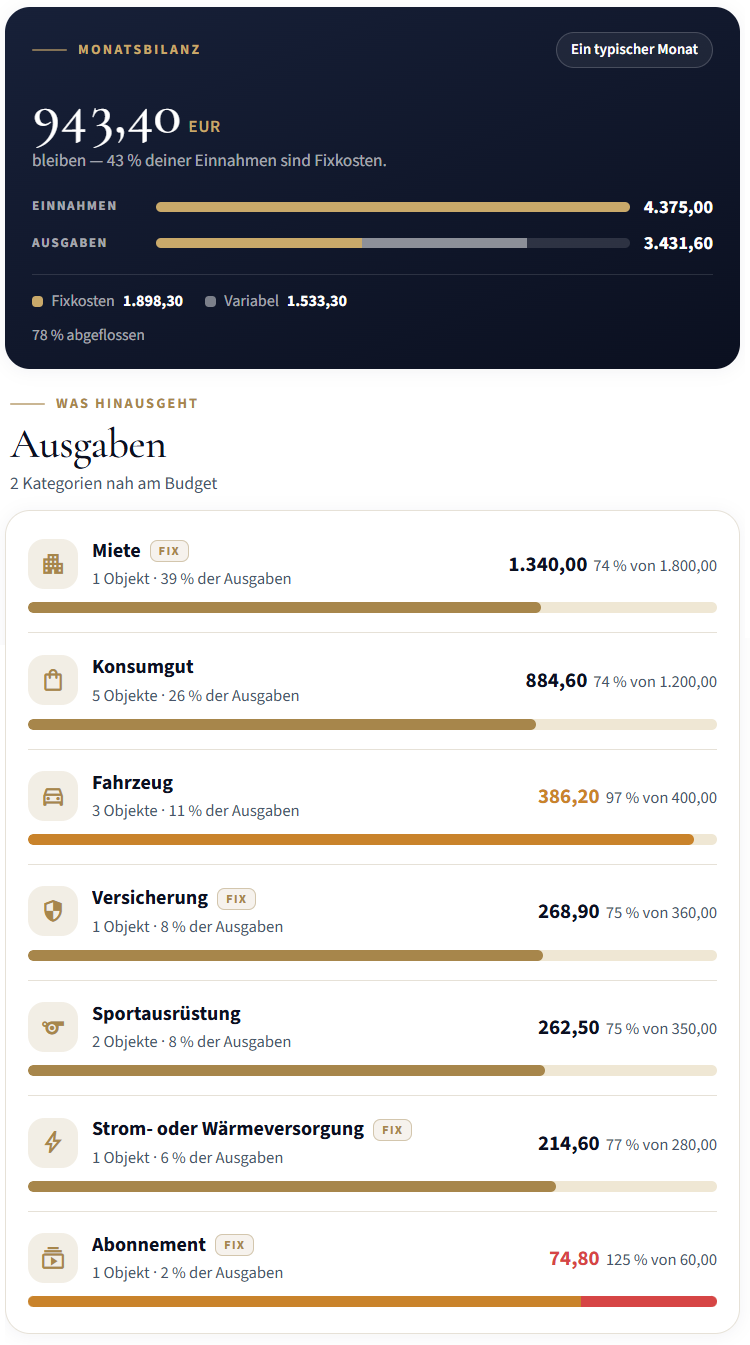
- At the top, set the month in which you went shopping.
- The lines of a supermarket receipt appear in their category, e.g. Consumable, with the receipt's total.
- An item with a purchase price and purchase date counts in the month of its purchase date.
- Clicking the category name shows the objects behind it. From there you get to every object and its receipt.
If a purchase is missing, usually the amount or the date is missing. Objects without an amount are left out of the totals. No notice tells you so.
Step 5: Find receipts again
To be honest up front: OWNAMIC cannot search the text of your receipts. You cannot search all your files for "Elektro Müller 349.00". The search Search inventory… and the search at the top check the name, description and tags of your objects. They do not check the contents of files. Here is how you still find receipts quickly:
- Through the object. Almost every receipt belongs to an item. Search for the item and open Files. Tap View or Download on the purchase receipt. Receipts on events are under Events, on the entry in question.
- Through tags. Give objects with receipts that matter for tax a tag such as
Tax 2026orTradesperson. The search then finds them all at once. - Through the purchase date. On the Home page you can sort your inventory under Search, Filter & Sort by Purchase Date (newest). That puts last month's purchases at the top.
- Through Warranties. Under Warranties, the Deadline Guardian lists every device with a running statutory warranty or guarantee, with its end date. That tells you which object to open.
- Through OWNY. In the chat you can ask: "What did I buy at Elektro Müller in 2026?" OWNY filters by Purchase Location and Purchase Date. That only works if you have filled in those fields. If a PDF invoice with real text is attached to the object, OWNY can also look inside it. Real text means you can select and copy words in the PDF. A plain picture of the page is not enough.
- Through the gaps. The Receipts & evidence page shows how many objects have a purchase receipt. And which objects still lack proof.
For your tax return or a folder outside your home:
- Under My documents, choose New export.
- Choose the objects concerned.
- Choose Include all files.
- For photographed receipts, also choose Include the original scan captures.
- Tap Generate export.
You get a ZIP file, which is a packed archive. It contains a report, the data as tables and all files. The files sit in folders named after the objects. OWNAMIC keeps the archive for 30 days.
If it happens: the device is broken
- Check the deadline. Warranties shows when the statutory warranty ends, counted from the purchase date. OWNAMIC has calculated this date. It is not information from the shop.
- Get the receipt. Open the object, then Files. Tap Download on the purchase receipt.
- Contact the right party. Within the statutory warranty, contact the shop. For a guarantee, contact the manufacturer, under its terms.
- Record it. Create the complaint and the repair as events. Attach the letter from the shop or workshop.
What OWNAMIC does not do here
- No search through the text of receipts. The search does not find shops, amounts and invoice numbers inside files.
- No automatic transfer from uploaded receipts. When you upload on the object, OWNY only recognises the type. You enter the purchase price, purchase date and purchase location. When you photograph a receipt with Single photo, OWNY takes over the price and date. It does not take over the purchase location.
- No legal assessment of the statutory warranty. The deadline shown is always the purchase date plus 24 months. OWNAMIC does not consider whether it was second-hand or a private sale. Nor whether you agreed a shorter period.
- No tax check. OWNAMIC does not split labour and material costs. It does not tell you what you can deduct under § 35a EStG.
- No substitute for the original where one is required. If a guarantee asks for the original receipt, the photo alone will not help.
- No accounting archive for businesses. The self-employed and companies have their own rules for keeping records. OWNAMIC does not cover them.
Checklist to take with you
- Till receipts captured with Single photo on the day of purchase, total checked
- Paying account recorded as an object of type Money, purchases booked from it
- Invoices for appliances and furniture filed on the object as a Purchase Receipt, type checked
- Purchase price, purchase date and purchase location entered on the object
- Manufacturer's guarantee recorded as a Guarantee End event, guarantee card attached
- Tradespeople's invoices filed as an event with the invoice and proof of transfer
- Invoices for work on the house or flat kept for at least two years
- Tags such as "Tax 2026" set on objects that matter for tax
- Originals kept where a guarantee requires them
- Once a year: export with all files and the original scan captures
Read on: Recording your home room by room · Never Hunt for a User Manual Again · How Clean Documentation with OWNAMIC Can Protect You from a Financial Disaster
Try it now
Free for 14 days, no payment details. All you need is your email address.
Registration is subject to our Terms and Conditions and Privacy Notice.
Sources
- German Civil Code (BGB) § 438, limitation of claims for defects (German): https://www.gesetze-im-internet.de/bgb/__438.html
- BGB § 476, deviating agreements in consumer sales (German): https://www.gesetze-im-internet.de/bgb/__476.html
- BGB § 477, reversal of the burden of proof, current wording at lxgesetze (German): https://lxgesetze.de/bgb/477
- Verbraucherzentrale: Statutory warranty and guarantee (German): https://www.verbraucherzentrale.de/de-x-simple/wissen/vertrage-reklamation/kundenrechte/gewahrleistung-und-garantie-5057
- Stiftung Warentest: Reader's question – faded till receipt (German): https://www.test.de/Leserfrage-Kassenbon-verblasst-4206503-0/
- German VAT Act (UStG) § 14b, keeping invoices (German): https://www.gesetze-im-internet.de/ustg_1980/__14b.html
- Chamber of Tax Advisers Nuremberg: record-keeping obligations and periods (private individuals, § 14b UStG, fine; German): https://www.stbk-nuernberg.de/images/Pressemitteilungen/PM_201604_Aufbewahrungspflichten_fristen.pdf
- Tax administration of North Rhine-Westphalia: end of the duty to submit receipts with the tax return (German): https://www.finanzverwaltung.nrw.de/sites/default/files/asset/document/2018-01-23_interneteintrag_belege_aufbewahrung_0.docx
- German Income Tax Act (EStG) § 35a, tax reduction for tradespeople's work (German): https://www.gesetze-im-internet.de/estg/__35a.html
- VDIV: Tax bonus for tradespeople's work set to fall from 2027 (German): https://vdiv.de/news-details/steuerbonus-fuer-handwerkerleistungen-soll-ab-2027-sinken
Deadlines, maximum amounts and draft laws may change. The information reflects the position in October 2026; the planned change to § 35a EStG had not been passed at that point.