Published by Adrian Vogel · Reading time: approx. 13 minutes · Last updated: October 2026
In short:
- At the end, each piece has photos, catalogue number, grade and papers in one place.
- You also get a collection file your heirs can understand.
- You need soft light, a calm background and about 20 minutes to prepare.
- OWNAMIC does not check authenticity. An AI estimate is not an appraisal.
Why a piece with papers fetches more than one without is covered in Value Loss Without Papers: Why Documentation Decides the Price. This article is the practical part. It shows how to set up a collection in OWNAMIC, photograph it and describe it. And how to file it so that it still makes sense without you. The approach works for coins, stamps, records, watches, minerals, books, comics and model cars.
What you should know
Each collecting field has its own language. A good digital collection speaks it. It does not swap the trade terms for plain words.
Catalogue numbers make a piece unambiguous. A catalogue number is the fixed number a catalogue gives a piece. "An old stamp" helps nobody, a Michel number does. The German Michel catalogue has been published since 1910. In German-speaking countries it is the standard reference for stamps. Dealers, auction houses and collectors use its numbers as a shared ID.
For coins from all over the world, KM numbers are widespread. They come from the Standard Catalog of World Coins, the "Krause catalogues". They start again at 1 for each country. So a number only means something together with the country. Numista lists such numbers in its online catalogue. But not every entry has a KM number. For records and CDs, Discogs keeps each release as its own entry, with its own sales history. A pressing from another country or year is a different item there.
Condition has its own scales. Collectors speak of the grade. That is the mark for how well a piece has been preserved. In the German coin trade these grades are usual: s (fine), ss (very fine), vz (extremely fine), unz (uncirculated) and stgl (brilliant uncirculated). There are in-between grades such as ss-vz. "PP" (proof) is not a grade. It is a special way of striking with mirror-like fields. Abroad, the Sheldon scale from 1 to 70 is common.
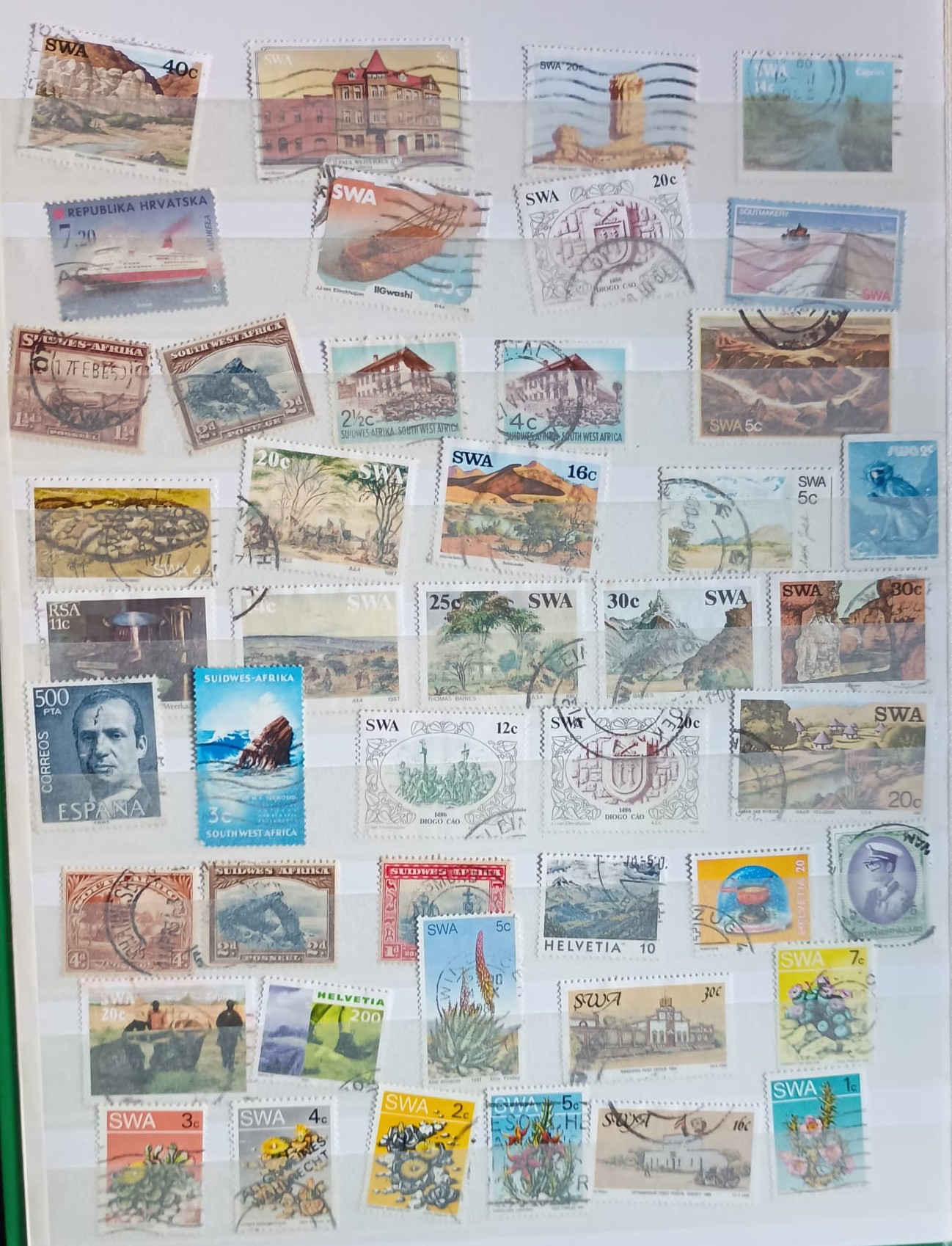
For stamps, the Michel catalogue distinguishes four conditions: mint never hinged (**), unused with hinge (*), cancelled and on cover. Mint never hinged means the gum on the back is untouched. A hinge is a small strip of gummed paper once used to mount stamps in albums. The catalogue gives a separate price for each condition.
Records are mostly graded to the Goldmine standard: Mint, Near Mint, Very Good Plus and so on. Vinyl and sleeve get separate grades. CGC grades comics on a scale up to 10.0. For watches, box and papers matter. For model cars, the original box matters. For minerals, the label with the locality matters.
The catalogue value is not a sale price. Michel prices are the catalogue's reference values. Dealers mostly pay much less. How to find a realistic value is covered in Finding Out What Things Are Worth.
Provenance is easily lost. Provenance means where a piece comes from and whose hands it passed through. A mineral collection without labels loses its localities. An album without context loses its story. So museums record their holdings all the time, not just when something goes missing. The German Museums Association (Deutscher Museumsbund) lists this as a minimum standard. On a small scale, the same applies to a private collection.
Preparation: order before the first photo (20 minutes)
- Do not re-sort anything you inherited. Specialists advise leaving an inherited collection as it is. Its original order tells a story of its own. Photograph it as it is first.
- Do not clean, soak off or unpack anything not meant for it. Stamps stay in the album. Proof coins are not touched with bare hands. A sealed comic case ("slab") stays closed.
- Set up a workspace. You need a table by the window without direct sun. Add a white or light-grey card as background. You also need tweezers for stamps and cotton gloves. And a ruler or a coin to show size.
- Decide on a structure. What will you search for later? For stamps, mostly by area and period ("West Germany", "German Reich"). For coins, by country and denomination, meaning the face value. For records, by genre or artist. For minerals, by mineral or region.
Step 1: Set up the collection as a structure
- Tap Plus and, under Manual, choose Template.
- Choose the "Collectibles" template. It suggests names such as "My Collectibles" or "Stamps". It creates sub-collections such as "Stamp collection", "Trading Cards" and "Limited Editions".
- Change, delete or add names and entries before saving, as you need.
- Add the structure from your preparation as sub-collections, for instance "West Germany 1949–1959" and "German Reich".
Do you work in the "Collection" edition? Then the menu shows Collections, Receipts & evidence and Re-estimates. You will need the first two in this guide.
Already have a list in Excel? Save it as CSV, a simple table format. Then use Plus → Import a file. OWNY reads the list. You check each row before saving. There is no direct import from Numista, Discogs or Michel software yet.
Try it now
Free for 14 days, no payment details. All you need is your email address.
Registration is subject to our Terms and Conditions and Privacy Notice.
Step 2: Photograph – light, background, both sides
A good collection photo is evidence, not a mood shot. Three rules apply to every field:
- Soft light, no flash. Diffuse light creates soft transitions instead of hard shadows. Shoot by the window in the shade. Or bounce a lamp off a light surface. Do not mix daylight and lamp light. Shiny pieces such as silver coins work well in a light tent made of white fabric. A flash reflects on slabs, sleeves and display glass. So photograph them at a slight angle.
- A calm, plain background. White or light grey, without pattern. The whole piece is sharp. Only the background may be blurred.
- Show the size. Place a ruler or a familiar coin next to the piece in the overview.
And always photograph both sides. Add the detail that carries the value:
| Field | Required pictures | Value-defining detail |
|---|---|---|
| Coins | Obverse, reverse, edge if relevant | Mint mark, year, scratches and edge knocks |
| Stamps | Front, back | Perforation, gum or hinge, expert marks, cancellation |
| Records | Sleeve front and back, both labels | Matrix etching in the run-out groove, scratches |
| Watches | Dial, case back | Reference and case number, box and papers |
| Minerals | Specimen from all sides | Original label with locality |
| Books and comics | Cover, spine, back | Title page, imprint, dedication, signature |
| Model cars | Model from all sides, base | Original box with item number |
For flat pieces such as stamps, receipts and album pages, a flatbed scanner often beats the camera. General scanning guides give 300 dpi for documents. dpi says how fine the scan is. For pictures you want to enlarge, they give 400 to 600 dpi. Watermarks are mostly invisible from the front. For those you need light from behind or a watermark detector.
Step 3: Choose the right capture type
Tap Plus, then Photo/Video. The camera opens. Now choose the capture type:
- Single photo for a whole album page or a display tray. OWNY frames each piece singly and creates it as its own object. In the video scenario on digitising a stamp collection, this captures 45 stamps from a single photo of a stockbook page.
- Photo series for many pieces, up to five photos. Spread the pieces out on a surface rather than stacking them. OWNY may count overlapping pieces as one object.
- Detail shots for each piece that matters. That means up to five photos of one object, which OWNY analyses together. This is where the must-have shots from the table go.
Before recognition, open "What the photo cannot show". There you enter what no photo shows. That is the origin, the purchase price and the grade in the language of your field ("vz", "mint never hinged **", "NM/VG+"). Under "Anything else", add the catalogue number, a certificate or a limited edition. Under "Adjust the analysis" you can set keywords, for example the name of your collection. There you also choose the Valuation type. For collectibles the default "Market observation" fits.
If OWNY is not sure, it does not guess. It asks and offers alternatives. The German help shows this in the video "Wenn OWNY nicht sicher ist" (When OWNY is not sure) under Image Recognition. There is also a video on capturing your first objects.
Then you check each find. You correct names and choose the sub-collection it belongs in. OWNY suggests a collection, you decide. You tick a box to confirm that the values are estimates. Then you save.
Costs: Anything you enter by hand is free. Recognised objects use AI credit. With market research they use more than without. OWNY always researches collectibles, watches, jewellery and art on the market.
Step 4: Record catalogue number and grade
Open each key piece and bring its details into a fixed form. OWNAMIC has no dedicated field for catalogue numbers. So always use the same pattern:
- Name: area, catalogue and number, grade, motif. For example "West Germany Michel 123 ** – Posthorn" or "South Africa 5 Shillings 1948, KM …, vz".
- Description: the details that set the value. For example pressing, variety, plate flaw, mis-strike or locality.
- Tags: the catalogue name and number again, e.g. "Michel 123". That way the search in your inventory list finds the piece again.
- Brand, Model and Serial Number: for watches, the maker, reference and case number. For model cars, the maker and item number.
- Amount: record duplicates as one object with a higher amount. Do this only if they really are identical.
The Condition field in OWNAMIC is a general scale. It runs from "New" through "Very Good" and "Good" to "Damaged". It does not know collector grades such as "vz" or "VG+". Choose the closest value. Add the proper grade to the name or description. Also check the Rarity that OWNY suggests critically. Correct it if needed.
Step 5: Attach receipts, certificates and provenance
A photo shows what you have. Only the papers show where it comes from and whether it is genuine.
Files. Open the piece and choose Upload File. Upload the invoice, the auction receipt, the certificate or the appraisal. A certificate here is an expert's written confirmation that a piece is genuine. Check the type OWNY suggests and correct it with Change type:
- Purchase Receipt for an invoice, a hammer-price confirmation or an order confirmation
- Certificate of authenticity for an expertiser's opinion or certificate, meaning a paper that confirms the piece is genuine
- Certified Appraisal for a written valuation by an appraiser
Events. With Add Event you record the piece's history. Which types are offered depends on the kind of object. For collectibles they include:
- Certificate of Authenticity with its own fields. These are "Issued by (gallery, auction house, appraiser)", "Certificate number", "Assessment result", "How was it assessed?" and validity dates.
- Find site & provenance: where the piece comes from and who owned it before. Also a collection or auction it passed through.
- Restoration, if someone has restored the piece.
You can attach up to three files to each event. Also photograph old labels, album leaves, dealer bags and letters. They often record the provenance.
Have it confirmed. Your own statement remains your own statement. For suitable events, tap Create signing link. This creates a link for the dealer or expertiser. They open it without an account. They confirm the entry with a code sent by email. After that the entry is sealed, meaning it can no longer be changed. Legally this is a simple electronic signature. That is the most basic form of digital confirmation. It shows who confirmed the entry. It does not show that its content is true.
The video "Der Lebenslauf einer Münze" (The life of a coin) shows the full path. You find it in the German help under Purchases & sales. It runs from capture through certificate to hand-over.
Step 6: Find the gaps
Open Receipts & evidence in the edition menu. The page shows how many values are documented, researched, estimated or assumed. And it shows which pieces have no value. A piece only counts as documented once a fitting file is attached. That is a Purchase Receipt, a Certified Appraisal or a Certificate of authenticity. OWNAMIC sets this status itself. You cannot assign it by hand.
Sort by value and work from the top down. Ten fully documented top pieces are worth more than a hundred documented duplicates.
Step 7: The collection file for your heirs
To heirs, a collection without explanation is often just a box. The collection file turns it into a record people can read.
Add first:
- Intended for: On each piece's detail page you note who should have it, use it or look after it. This is a personal wish. It is not a disposition by will, meaning a legally effective rule for after your death. It does not replace a will.
- Story: The "Order & Legacy" edition has What matters to me. There you write down the story of the pieces you put on the "Keep" pile while sorting.
- Contacts: Note in the description of the main collection whom people can ask: your dealer, your club, an expertiser.
Create it:
- Open the main collection and choose Export.
- Choose This object and all descendants, then Export as PDF.
- Choose the type Collection file. Under Include Images, choose "All non-AI generated images".
The cover page lists each piece. It shows for eight building blocks whether they are present: photos, purchase receipt, proof of authenticity, provenance, condition, value with source, story and meant for. You can see at a glance what is still missing.
Two limits are worth knowing. First, one export covers at most 200 objects. For larger collections, export each sub-collection on its own. Second, the PDF does not contain the attached documents. It only lists them. For certificates and invoices, do this:
- Go to My documents → New export and select the collection.
- Switch on Include all files and Include contained objects.
- Set Report type to "Collection file".
- Tap Generate export.
The archive holds the file as a PDF, plus all photos and receipts in folders. OWNAMIC keeps it for 30 days. Download it and tell your family where it is.
Common mistakes
- Photographing only the front. With stamps the back often decides (hinge, gum, expert marks), with coins the edge.
- Using a flash through the sleeve. A reflection covers exactly the spot that matters.
- Talking up the grade. A "vz" that is really an "ss" makes the whole record less credible.
- Throwing away labels and envelopes. They are often the only proof of provenance.
- Entering the catalogue value as the value. It is a reference, not a price anyone pays.
What OWNAMIC does not do
- OWNAMIC does not check authenticity. OWNY cannot spot a forgery that looks like the original. That is the work of expertisers and appraisers.
- OWNAMIC does not know collector grades. The condition field is general. You add the proper grade yourself.
- OWNAMIC is not connected to Michel, Numista or Discogs. You enter catalogue numbers yourself. There is no import from these services.
- OWNAMIC does not warn you about duplicates automatically. Search for the catalogue number before you create a piece.
- An AI estimate is not an appraisal. It is a non-binding indication, mostly based on asking prices.
- The collection file is not a will. "Intended for" records a wish and has no legal effect.
Checklist to take away
- Inherited collection photographed as it was, before anything was re-sorted
- "Collectibles" template set up and sub-collections added to match your structure
- Workspace with soft light, a calm background and a size reference set up
- Album pages captured as single photos, important pieces as detail shots, always both sides
- Catalogue number, grade and origin entered in name, description and tags
- Purchase receipts, certificates and appraisals uploaded and their type checked
- Provenance and certificates recorded as events, key entries confirmed by a third party
- Gaps in "Receipts & evidence" worked through
- "Intended for" and stories added, contacts noted
- Collection file created as PDF and as ZIP with all files, and your family told where it is
Read on: Archive your collection with OWNAMIC · Finding Out What Things Are Worth · Value Loss Without Papers · What survived two decades in the cupboard
Try it now
Free for 14 days, no payment details. All you need is your email address.
Registration is subject to our Terms and Conditions and Privacy Notice.
Sources
- Stiftung Warentest: Stamp collections – what are old stamps still worth? (BDPh advice, Michel prices as reference values, APHV dealer directory): https://www.test.de/Briefmarken-So-finden-Sie-heraus-was-geerbte-Sammlungen-wert-sind-5128885-0/
- Briefmarkenmesse Essen, glossary: Michel catalogue: https://www.briefmarkenmesse-essen.de/glossar/michel-katalog/
- Briefmarkenmesse Essen, glossary: postfrisch (BPP definition, gum only): https://www.briefmarkenmesse-essen.de/glossar/postfrisch/
- Briefmarkenmesse Essen, glossary: hinge (Falz): https://www.briefmarkenmesse-essen.de/glossar/falz/
- eBay stamp guide: philatelic terms (condition): https://pages.ebay.de/briefmarkenratgeber/fachbegriffe/e.html
- Wikipedia: Standard Catalog of World Coins (KM numbers): https://en.wikipedia.org/wiki/Standard_Catalog_of_World_Coins
- CoinWeek: KM Number – a commonly referred to world coin reference number: https://coinweek.com/km-number-a-commonly-referred-to-world-coin-reference-number/
- StoneX Bullion, glossary: coin grades (German): https://stonexbullion.com/de/lexikon/erhaltungsgrade/
- Numismatic News: The Sheldon Coin Grading Scale: https://www.numismaticnews.net/collecting-101/the-sheldon-coin-grading-scale
- Goldmine: Collecting 101 – grading your records: https://www.goldminemag.com/collector-resources/collecting-101-grading-your-records/
- CGC Comics: on the grading scale up to 10.0: https://www.cgccomics.com/news/article/243/
- GIGA: Selling CDs (Discogs sales history per release, German): https://www.giga.de/artikel/cds-verkaufen-lohnt-sich-das-welche-sind-wertvoll/
- Deutscher Museumsbund: checklist of standards for museums – documentation: https://www.museumsbund.de/wp-content/uploads/2023/07/dmb-checkliste-standards-fuer-museen-dokumentieren.pdf
- Library of Congress: Scanning your personal collections (resolution): https://www.digitalpreservation.gov/personalarchiving/documents/scanning_collections.pdf
Grading scales and catalogue conventions differ between collecting fields, catalogues and editions. What counts is the reference that is usual in your field.